PICO-8 palette: 16 colours with hex codes

The PICO-8 palette
The PICO-8 palette is sixteen colours, chosen to read well together at small sizes. It is the palette every new sprite in PixelFlipbook starts with.
| Colour | Swatch | Hex | RGB |
|---|---|---|---|
| 0, black | #000000 | 0, 0, 0 | |
| 1, dark blue | #1d2b53 | 29, 43, 83 | |
| 2, dark purple | #7e2553 | 126, 37, 83 | |
| 3, dark green | #008751 | 0, 135, 81 | |
| 4, brown | #ab5236 | 171, 82, 54 | |
| 5, dark grey | #5f574f | 95, 87, 79 | |
| 6, light grey | #c2c3c7 | 194, 195, 199 | |
| 7, white | #fff1e8 | 255, 241, 232 | |
| 8, red | #ff004d | 255, 0, 77 | |
| 9, orange | #ffa300 | 255, 163, 0 | |
| 10, yellow | #ffec27 | 255, 236, 39 | |
| 11, green | #00e436 | 0, 228, 54 | |
| 12, blue | #29adff | 41, 173, 255 | |
| 13, lavender | #83769c | 131, 118, 156 | |
| 14, pink | #ff77a8 | 255, 119, 168 | |
| 15, light peach | #ffccaa | 255, 204, 170 |
This page lists the colours in PICO-8's own order, 0 to 15. The editor's built-in list puts blue first, so the swatches appear in a different order there. The colours are the same.
To use these colours in another program, copy the list. It is one hex code per line, with no hash, which is the shape most palette pasters want.
000000
1D2B53
7E2553
008751
AB5236
5F574F
C2C3C7
FFF1E8
FF004D
FFA300
FFEC27
00E436
29ADFF
83769C
FF77A8
FFCCAAAbout PICO-8
PICO-8 is a fantasy console: a pretend game machine, made by Lexaloffle Games, with limits chosen on purpose. A game runs on a 128 by 128 pixel screen with these sixteen colours, and a finished game can be shared as a small picture file. The limits are the point, because a small screen and a small palette keep a game small enough to finish. PICO-8 also has a second set of sixteen colours that a program can switch in. This page lists the standard sixteen, the ones every PICO-8 game starts with.
- The white, #fff1e8, is a warm off-white. Next to the peach it looks soft, and it never glares the way pure white does.
- Black is the only true black. For shadows, dark blue (#1d2b53) is usually a better choice than black, because it keeps the picture from going flat.
- The dark grey, #5f574f, leans brown. Use it for stone, wood and smoke, where a neutral grey would look cold.
- Lavender, #83769c, is the quiet colour. It is good for distant hills, fog and night skies.
Use it in the editor
The palette is built in, so you do not need to paste anything.
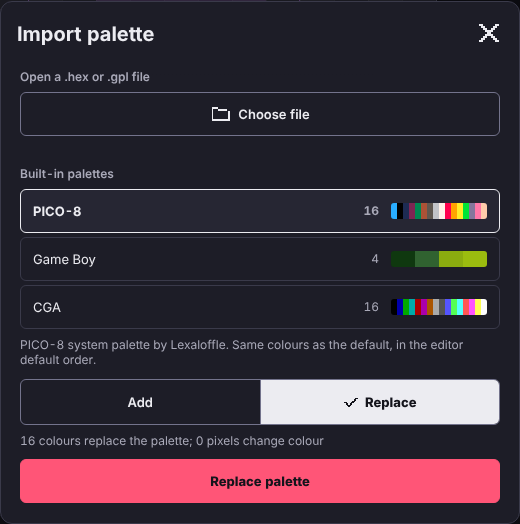
- Open the editor and open the palette menu: the three dots at the top of the palette panel.
- Choose Built-in palettes, then PICO-8.
- Choose Add to put its colours after the ones you have, or Replace to swap your palette for this one. A line shows what will happen before you commit, for example how many pixels change colour.
- Press the button at the bottom. The whole change is one step, so Undo takes it back.
The editor cannot take a palette from a link, so the sample above does it another way. Open it in the editor with this palette opens the little walker as your own copy, with the palette already loaded. Clear the canvas or draw over it, and the palette stays. The original is never changed, and each time you open it you get a new project.
How the sample was made
The sample is the Walk starter, which is drawn in the PICO-8 palette. For the other palettes, each colour was swapped for the nearest colour in the new palette, measured as the distance between the two colours in red, green and blue. That is exactly what Replace does in the editor, so the sample shows what you would get, not a touched-up version. Sometimes the nearest colour is not the one you would pick by eye, and that is where you step in and fix a few pixels.
The picture was made at 16 by 16 pixels, with each pixel drawn as a block of 8 by 8 on screen, so the edges are sharp.
Tips for this palette
- It has two good darks (black and dark blue), two skin-friendly warm tones (light peach and brown) and a bright, saturated colour for every hue, so it suits characters, items and backgrounds on the same screen.
- A ramp from dark to light for one hue: dark blue, blue, then white for a highlight. Red, orange and yellow make a fire. Dark green, green and light peach make a leaf.
- Sixteen colours is a real limit. If a sprite needs a seventeenth, it usually needs a different shape, not another colour.
Where it comes from
The PICO-8 system palette comes from the PICO-8 fantasy console, a product of Lexaloffle Games, and its sixteen colours are listed in the PICO-8 manual. PixelFlipbook is not affiliated with Lexaloffle. The editor lists the colours with blue first, so that your first brush colour is vivid. The numbers on this page are PICO-8's own, 0 to 15.
Lospec, the palette site that most pixel artists know, lists many more palettes, each with its author named. Find more at Lospec. The editor's Browse palettes button reads that list directly when you open it, so authors are credited where they published. Palettes from Lospec are not copied onto this site. We found no licence for reuse in Lospec's terms, so this site only shows the palettes that ship with the editor.
Other palettes here: Game Boy palette, CGA palette, and the palette index. To edit, import or keep colours exact, read the palettes guide.