Commodore 64 palette: 16 colours with hex codes

The Commodore 64 palette
The Commodore 64 shows sixteen colours. They are muted and a little earthy: black, white and three greys, two blues, a mossy green and a pale one, and a brown, an orange and a purple that all sit low in saturation. Nothing is pure, and even the red leans brown.
| Colour | Swatch | Hex | RGB |
|---|---|---|---|
| 0, black | #000000 | 0, 0, 0 | |
| 1, white | #ffffff | 255, 255, 255 | |
| 2, red | #68372b | 104, 55, 43 | |
| 3, cyan | #70a4b2 | 112, 164, 178 | |
| 4, purple | #6f3d86 | 111, 61, 134 | |
| 5, green | #588d43 | 88, 141, 67 | |
| 6, blue | #352879 | 53, 40, 121 | |
| 7, yellow | #b8c76f | 184, 199, 111 | |
| 8, orange | #6f4f25 | 111, 79, 37 | |
| 9, brown | #433900 | 67, 57, 0 | |
| 10, light red | #9a6759 | 154, 103, 89 | |
| 11, dark grey | #444444 | 68, 68, 68 | |
| 12, grey | #6c6c6c | 108, 108, 108 | |
| 13, light green | #9ad284 | 154, 210, 132 | |
| 14, light blue | #6c5eb5 | 108, 94, 181 | |
| 15, light grey | #959595 | 149, 149, 149 |
The colours run in the C64's own numbering, 0 to 15, the order of the table in Pepto's article.
To use these colours in another program, copy the list. It is one hex code per line, with no hash, which is the shape most palette pasters want.
000000
FFFFFF
68372B
70A4B2
6F3D86
588D43
352879
B8C76F
6F4F25
433900
9A6759
444444
6C6C6C
9AD284
6C5EB5
959595About Commodore 64
The Commodore 64 went on sale in 1982, and its VIC-II video chip makes the sixteen colours. In its high-resolution bitmap mode each block of 8 by 8 pixels could use only two of them, which is why so much C64 art has hard colour edges on a grid. In multicolour mode the picture is 160 pixels wide, each pixel twice as wide as a normal one, and a block can use more colours.
- The values here are Pepto's from 2001. Other people have measured the chip since and their sets differ a little, so a C64 palette in another program can look different from this one. None of them is the colour on your screen, which depended on the TV.
- The two blues, #352879 and #6C5EB5, are the C64 screen colours most people remember: a dark blue and a lighter one.
- Brown (#433900) and orange (#6F4F25) are close, both dark and olive. Light red (#9A6759) is the one to try for skin.
Use it in the editor
The easy way is the link under the animation at the top of this page: Open it in the editor with this palette opens a little walker as your own copy, with all 16 colours loaded. Clear the canvas or draw over it and the palette stays. The original is never changed, and each time you open it you get a new project.
To put the palette into a sprite you already have, paste the list.
- Copy the hex list above.
- Open the editor and open the palette menu, the three dots at the top of the palette panel.
- Choose Paste hex list and paste. The editor says how many colours it found: 16 here.
- Choose Add to put the colours after the ones you have, or Replace to swap your palette for this one, and press the button at the bottom. A line shows what will change first, for example how many pixels change colour. The whole change is one step, so Undo takes it back.
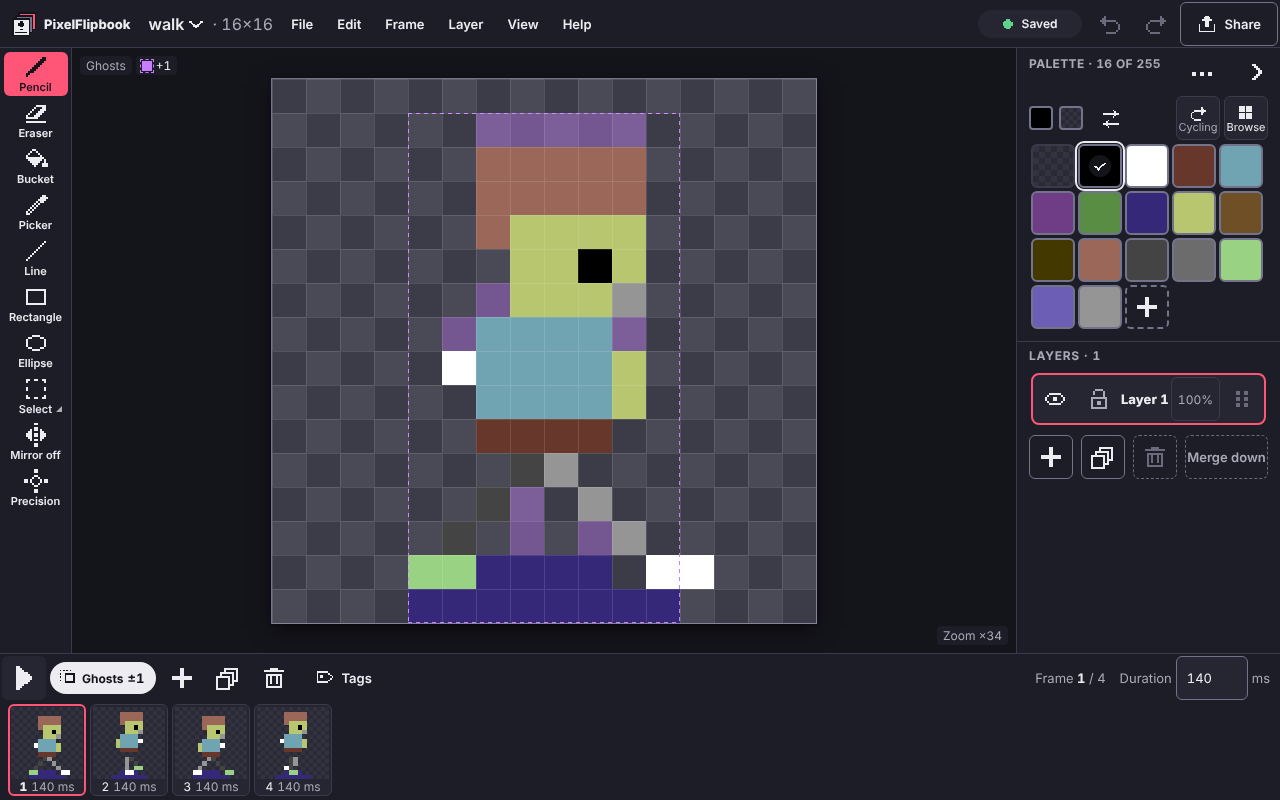
How the sample was made
The sample is the Walk starter, which is drawn in the PICO-8 palette. It was opened in the editor, the hex list was pasted with Paste hex list and applied with Replace, and the GIF was exported from the editor. Replace swaps each colour for the nearest colour in the new palette, measured as the distance between the two colours in red, green and blue. So the sample shows what you would get, not a touched-up version. Sometimes the nearest colour is not the one you would pick by eye, and that is where you step in and fix a few pixels.
The picture is 16 by 16 pixels, with each pixel drawn as a block of 8 by 8 on screen, so the edges are sharp.
Tips for this palette
- The greys are a short ramp of five steps, black, dark grey, grey, light grey and white. Shade metal and stone with them and keep the colours for things that matter.
- Because the colours are low in saturation, a single bright pixel stands out. White or light green next to the darker colours is a strong highlight.
- Try the blue pair for a sky and a lake before reaching for cyan. Cyan is grey-blue and sits quietly.
Where it comes from
The values on this page are the C64 colours worked out by Philip "Pepto" Timmermann in 2001 (PAL VIC-II). Source: Philip "Pepto" Timmermann, "Commodore 64 colors", pepto.de, 12 March 2001.
Brightness levels were measured with an oscilloscope by Marko Mäkelä in 1996, colour angles with a vectorscope by Pepto in 1999, and the result was converted to RGB with a gamma of 1.136. The page itself says the gamma is not certain.
Commodore 64 is the name of a product that Commodore made, and PixelFlipbook is not affiliated with Commodore or with Pepto. Colour values are facts about hardware, not artwork, and each one here is taken or computed as described above, and from nowhere else.
Lospec, the palette site that most pixel artists know, lists many more palettes, each with its author named. Find more at Lospec. The editor's Browse palettes button reads that list directly when you open it, so authors are credited where they published. Palettes from Lospec are not copied onto this site. We found no licence for reuse in Lospec's terms, so every palette here comes from the named hardware source instead.
Other palettes here: MSX palette, Windows 16 palette, and the palette index. To edit, import or keep colours exact, read the palettes guide.